

Have you ever been setting up a new website and seen an add-on called a “Dedicated IP Address” for an extra $5 a month? You probably hesitated, wondering if it was a critical upgrade or just a clever upsell. You’re not alone. For most people, the term “IP address” is technical jargon they’ve heard but never really had to understand. Deciding whether you need to buy an IP address feels like a guess, but it doesn’t have to be. Find the best proxies for linkedin.
Think of an IP address as a simple street address, but for a device or service on the internet. Just as your home address tells the postal service where to deliver your mail, an IP address tells the internet where to send data—like the video you’re streaming or the website you’re trying to load. Every device connected to the internet has one, but they aren’t all the same. In practice, the free one you get is often temporary or shared with others.
The confusion comes from this difference. While a standard, temporary address is fine for browsing, certain tasks require a more permanent and private solution. Understanding what is a static IP address (a permanent one) or why you might need to get a dedicated IP (a private one) is crucial for everything from hosting a game server for your friends to making sure your business emails don’t land in the spam folder.
This guide breaks down the different types in simple terms, highlights the specific scenarios where buying one is a smart move, and walks you through how to get one from your web host or internet provider. You’ll have a clear framework to make the right choice with confidence.
Your Internet’s “Address” Keeps Changing: Understanding Dynamic vs. Static IPs
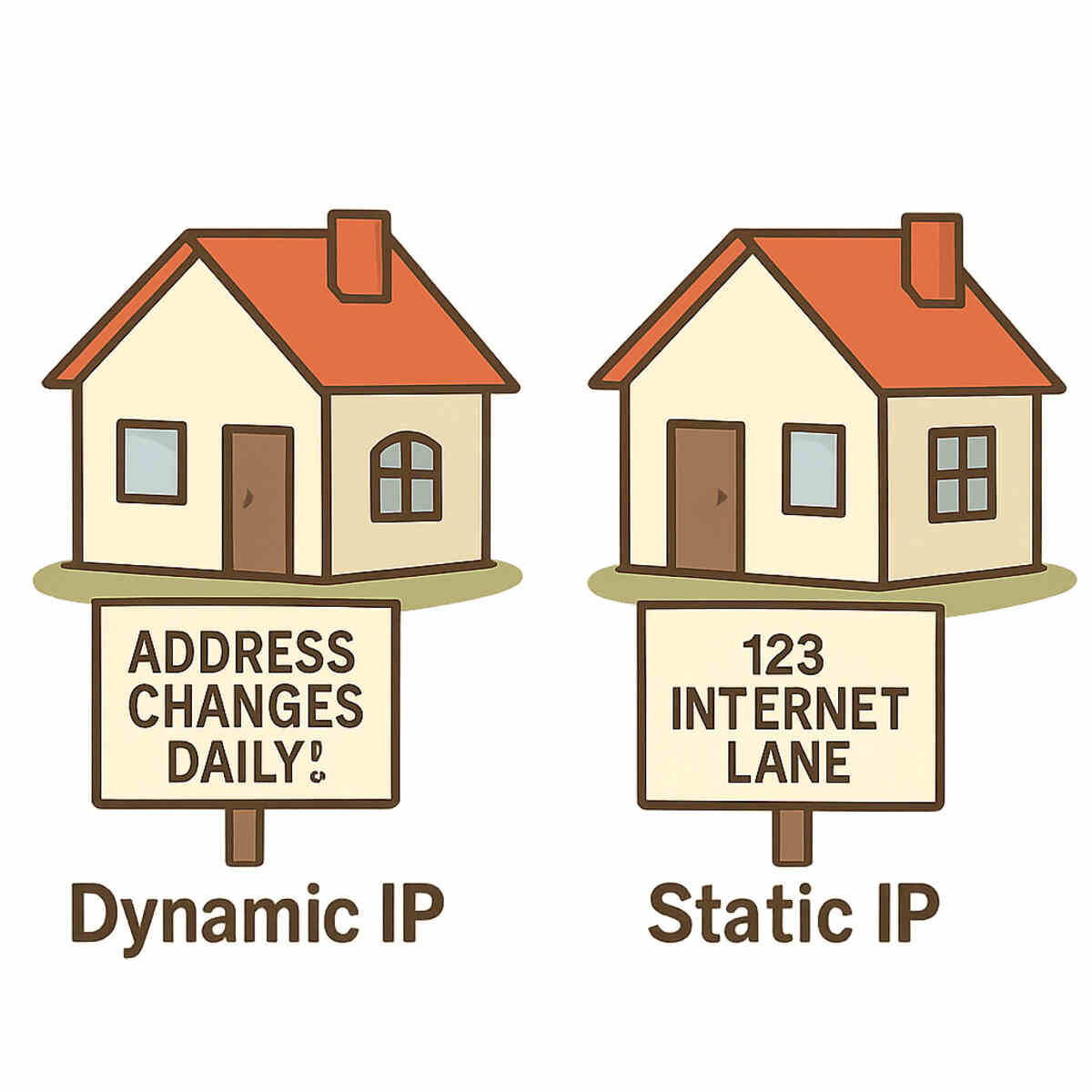
Think about the internet connection at your house. You have a public IP address, but it’s most likely not permanent. The vast majority of Internet Service Providers (ISPs) assign you a dynamic IP, which is like getting a random spot in a public parking garage each day. It works perfectly for browsing the web and streaming movies, but it means your “address” can change without notice—tomorrow, or next week. This is because ISPs have a limited pool of addresses, and it’s more efficient for them to simply hand out available ones as needed.
The solution to this shifting address problem is a static IP. Instead of a temporary spot, a static IP is like your own permanently reserved parking space—it’s always yours and it never moves. When you get a static IP from your provider, you effectively change your public IP address permanently. No matter how many times you restart your router or how long you’re offline, that specific address remains assigned exclusively to your home network.
For everyday internet use, this difference between static vs dynamic rarely matters. But what if you want to reliably access something on your home network from anywhere in the world? Imagine trying to check your home security camera while on vacation, only to find its address has changed. A static IP ensures you can always connect to your devices, making it a crucial upgrade for hosting a personal game server for friends or ensuring remote access to a computer or security system.
When Is a Static IP Worth Paying For? 3 Common Scenarios
A static IP is a permanent, unchanging address for your home network, but do you actually need one? For most people who just browse the web, stream shows, and send emails, the answer is a simple “no.” The dynamic IP your Internet Service Provider (ISP) gives you for free works perfectly fine.
However, paying a few extra dollars a month for a static IP becomes essential the moment you need to turn your home network into a reliable destination for others. If you need people or devices on the outside internet to find you consistently, a static IP is no longer a luxury—it’s a requirement.
Here are the most common reasons to get one:
- Hosting Your Own Game Server: If you want to host a game like Minecraft or Valheim for your friends, they need a stable address to connect to. With a dynamic IP, that address could change every day, forcing you to constantly send out the new one. A static IP ensures your server’s address never changes.
- Reliable Remote Access: Do you want to check your home security cameras, access files on a personal storage device (NAS), or connect to your home computer from work? A static IP guarantees you can always reach your network. It’s also crucial if you want to set up your own personal VPN to securely browse the internet through your home connection while traveling.
- Running a Home Server (for advanced users): For those with more technical experience, a static IP is necessary to run a small web server, an email server, or other internet-facing services directly from home without interruption.
The decision to buy a static IP comes down to reliability. It’s for anyone who needs to provide a stable, predictable entry point to their home network. This is just for your home connection; when you’re running a website on a professional web host, you face a similar, but distinct, concept: the dedicated IP.
The “Noisy Neighbor” Problem: Why Your Website Needs a Dedicated IP
While a static IP solves the “where to find you” problem for your home network, running a website introduces a similar, but distinct, challenge. Most affordable web hosting plans place your website on a shared IP address. Think of it like living in a massive apartment building where your site and hundreds of others all use the same mailing address. It’s a cost-effective way to get online, but it comes with a hidden risk.
The main drawback of sharing an IP is what’s known as the “noisy neighbor” problem. If another website on your shared IP starts sending out thousands of spam emails or engages in shady activity, email providers like Gmail can blacklist the entire IP address to protect their users. Suddenly, your legitimate business newsletters might get blocked or sent straight to the spam folder—not because of anything you did, but because of a neighbor you don’t even know. This shared address now has a bad reputation, and you’re unfairly associated with it.
This is precisely why you might want to buy a dedicated IP address for your website. A dedicated IP is like moving out of the apartment building and into a private house with its own unique address. Your website’s reputation is now entirely your own. You are insulated from the actions of others, which is crucial for any e-commerce store or business that relies on email to reach customers. For a few extra dollars a month, you gain control and protect your brand’s credibility.
How to Actually Get a Static IP from Your Internet Provider
Getting a permanent address for your home internet connection is more straightforward than you might think. It’s not something you buy from a third-party store; you request it directly from your Internet Service Provider (ISP)—the company you already pay for Wi-Fi, like Comcast, Verizon, or AT&T. In most cases, a static IP is offered as a simple, paid monthly add-on to your existing service.
Before you pick up the phone, however, there’s one common hurdle to be aware of. Many ISPs reserve static IP addresses for their “business” internet plans. This doesn’t necessarily mean you need to own a registered company. These plans are often available to residential customers, but they may cost slightly more. Sometimes, asking to buy a static IP address means you’ll be gently nudged toward one of these upgraded packages.
Ready to make the request? Here’s a simple game plan that usually works:
- 1. Check Their Website First: A quick search on your ISP’s website for “business internet” or “static IP” can often tell you if it’s an option and what it costs.
- 2. Call and Ask Directly: Dial your provider’s support line and use this specific phrasing: “I would like to request a static IP address for my account. Is this service available?” This direct question cuts right to the point.
- 3. Be Prepared for the Fee: Expect to pay a small monthly charge for the convenience. The cost typically falls between $5 and $15, which you can think of as the price for reserving your permanent spot on the internet.
Once it’s set up, your ISP handles all the technical details, and your home network’s address will no longer change. This process secures a stable address for your personal use, like gaming or remote access. Remember, this is separate from getting a dedicated IP for a website, which is handled through your web host to protect your site’s reputation.
Your Ticket Out of the Spam Folder: Why Email Marketers Buy Dedicated IPs
If you’ve ever spent hours crafting the perfect email newsletter only for it to land in your subscribers’ spam folders, you’ve felt the frustration of poor deliverability. The problem might not be your content, but your address. When you use a standard email marketing plan, you often share an IP address with hundreds, or even thousands, of other senders. It’s like living in a massive apartment complex where everyone shares the same mailing address.
The reason this matters is a crucial concept called sender reputation. Email providers like Gmail and Outlook act like a digital post office, and they judge incoming mail based on the reputation of the address it comes from. If one of your “neighbors” in that shared IP address complex starts sending out spam, the post office may flag the entire address as suspicious. Suddenly, your legitimate, well-crafted emails are treated like junk mail simply because you share an address with a bad actor. This is how you can find yourself on a blocklist through no fault of your own.
This is where buying a dedicated IP for your email campaigns becomes a powerful solution. It’s the equivalent of moving out of the crowded apartment building and into a private house with its own mailbox. Now, your sender reputation is entirely your own. Your good sending habits directly build a positive reputation, which helps you avoid IP address blacklisting and ensures your emails reach the inbox. You are in complete control of your destiny.
For this reason, a dedicated IP is rarely necessary for a small, personal newsletter. But for any business or creator sending high volumes of email, it’s a critical investment. The dedicated IP address cost is weighed against the immense value of ensuring customers actually see your announcements and promotions. This control makes a dedicated IP a valuable asset. But when you “buy” one, are you truly owning a piece of the internet, or is it more like a long-term rental?
Can You Really “Own” an IP Address? The Truth About Leasing vs. Buying
When you “buy” a dedicated IP, it’s natural to wonder: is it possible to own an IP address in the same way you own a car or a house? The short answer is no. In reality, you are leasing or renting it. Think of it like a phone number; you have exclusive rights to use it as long as you pay your bill, but the phone company ultimately controls it. When you pay a web host or Internet Service Provider (ISP) for an IP, you’re paying for the exclusive right to use that address for a set period.
The reason for this rental system lies in how the internet was built. The global organizations that manage the internet’s address book only assign large groups of addresses, known as blocks, to service providers. Furthermore, the original pool of internet addresses (known as IPv4) has almost completely run out. This scarcity has turned available IPv4 addresses into a form of digital real estate. Because they are a finite resource, providers use IP address leasing services to manage their limited supply, ensuring addresses are actively used and can be reassigned when a customer no longer needs them.
What you’re paying for is a combination of scarcity and service. The cost covers the provider’s expense in acquiring and managing its IPv4 address block lease, as well as the service of directing that unique address to your website or server. You’re securing your own private, reliable spot on the internet—but that spot is part of a much larger, globally managed grid. Since these addresses are managed and distributed by region, they also have a physical location tied to them, which opens up some interesting possibilities.
How to Get an IP Address from a Different Country (And Why You’d Want To)
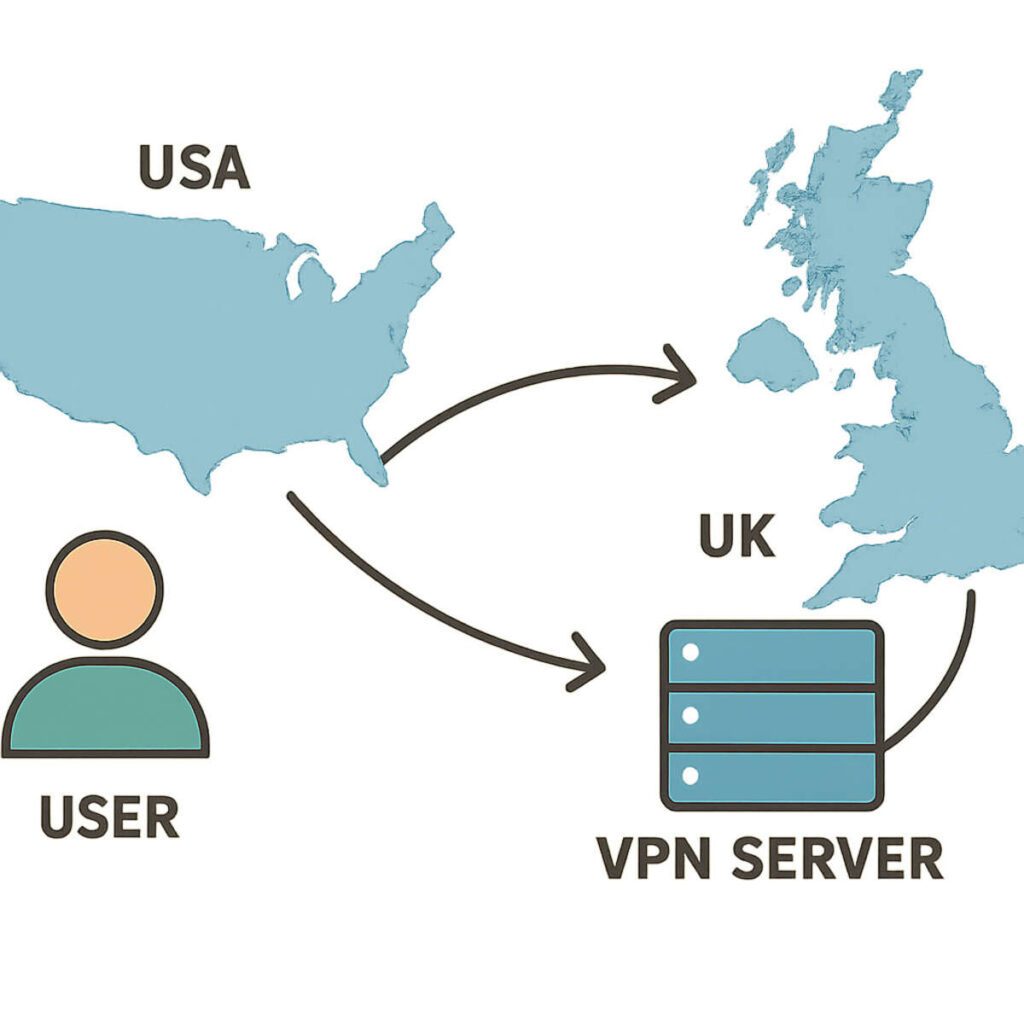
The fact that every IP address is tied to a real-world location creates a common frustration for internet users: geo-restrictions. Have you ever tried to watch a video or access a shopping site, only to be met with a “not available in your region” message? This happens because the website sees your IP address is from an unapproved country. The solution isn’t to buy an address overseas. Instead, the most common way how to get an IP address from a different country is by using a service that temporarily masks your real IP with one of its own.
This is exactly what a Virtual Private Network (VPN) does. Think of a VPN as a secure, private tunnel for your internet connection. You connect to a server in the country of your choice—say, Japan—and your traffic travels through this tunnel, emerging from the server in Tokyo. To every website you visit, it now looks like you’re browsing from a Japanese IP address, unlocking content that was previously blocked. Most of the time, you’re sharing this foreign IP with other users, but some providers let you get a dedicated IP for VPN use, giving you a unique, consistent address in that country for a higher fee.
However, not all foreign IPs are created equal. Streaming services and other websites are getting better at spotting traffic that comes from the huge data centers that power most VPNs. Because of this, a more advanced (and often more expensive) option is to use a residential IP address. This is an IP that’s assigned to a real home internet connection, making your traffic look completely normal and much less likely to be blocked. This distinction between a commercial data center IP and a residential one is becoming increasingly important for reliable access.
Datacenter vs. Residential IP: Why “Where” Your IP Comes From Matters
Not all IP addresses are viewed the same way. The distinction between a datacenter IP vs a residential IP comes down to trust, and it’s a bit like the difference between a commercial P.O. box and a home mailing address. A datacenter IP address comes from a massive server farm—a known commercial location. A residential IP, on the other hand, is an address assigned by an Internet Service Provider (like Comcast or Verizon) directly to a home. To websites and online services, one looks like a business operation, while the other looks like a regular person.
This difference becomes critical when you’re trying to access services that are wary of automated traffic, bots, or users hiding their location. Streaming platforms, for instance, are very good at spotting and blocking connections from known data centers. The primary benefits of a residential IP address are that it makes your connection appear completely authentic, blending in with regular home internet traffic. Because it’s tied to a physical residence, it’s far less likely to be automatically flagged or blocked, making it the superior choice for tasks that require a high level of trust.
For most casual VPN use, like securing your connection on public Wi-Fi, a standard datacenter IP is perfectly fine. But if you find yourself constantly blocked from services even while using a VPN or proxy, you likely need a residential IP. Finding the best static IP provider for your needs often means choosing a service that offers these more trusted residential addresses. However, even with the right type of IP, its history matters. An address can develop a bad reputation, making it less effective.
How to Keep Your New IP Address “Clean” and Off Blacklists
Just like a new car, a new IP address needs to be maintained to keep its value. If your IP’s reputation gets tarnished, it can land on an IP address blacklist. Think of a blacklist as a “do not answer” list used by email providers and security systems across the internet. If your IP is on it, your emails will go straight to spam folders, and some visitors might even be blocked from reaching your website. This makes your investment a waste, as the dedicated IP address cost brings you no benefit if no one can receive your messages.
Protecting your IP reputation is straightforward and mostly comes down to good digital hygiene. The goal is to show internet service providers that you are a trustworthy sender, not a source of junk mail or malicious activity. Here are the most critical steps to avoid IP address blacklisting:
- Never send unsolicited bulk emails (what everyone calls spam).
- Secure your website and devices to prevent hackers from using your IP to send spam without your knowledge.
- If sending lots of emails, use a “warm-up” process.
That last point is crucial for anyone with a newsletter or customer email list. Suddenly sending thousands of emails from a brand-new IP address looks highly suspicious to providers like Gmail and Outlook. An IP warm-up is the practice of starting small—sending emails to just a few hundred recipients—and gradually increasing your volume over several weeks. This slow-and-steady approach builds trust and proves to the internet that you’re one of the good guys, ensuring your IP stays clean and effective.
Your Quick-Scan Checklist: Do You Actually Need to Buy an IP Address?
This all comes down to one simple question: “Do I need a dedicated IP?” For the vast majority of people, the answer is no. Your standard internet connection and basic web hosting plan work perfectly well for browsing, streaming, and running a simple personal website. Paying for a special IP address when you don’t need one is like renting a commercial delivery van just to pick up groceries.
But for a specific set of users, that small extra dedicated IP address cost is a game-changer that solves real, frustrating problems. To find out which group you’re in, use this straightforward checklist.You Should Consider Buying an IP If…
- You host a game server (like for Minecraft) and need a permanent, easy-to-remember address for your friends to connect to. This is the classic reason to buy a static IP from your internet provider.
- You run an e-commerce store and want to ensure your checkout process is secure and not sharing resources with other potentially problematic sites on the same server.
- You send marketing emails or newsletters to a large list and want to protect your sending reputation to avoid your messages landing in the spam folder.
- You need to reliably access a device at home from anywhere, such as a security camera system or a personal computer, without the address constantly changing.
- Your web host requires it to install a specific type of security certificate (SSL) or feature on your site.
You Probably DON’T Need to Buy an IP If…
- You just use the internet for browsing, streaming video, and checking email.
- You run a simple personal blog or a portfolio website with no online store.
- You send occasional emails to a small group of people.
- Your website is a basic “brochure” site for a local business.
Your IP Action Plan: What to Do Next
You no longer have to guess whether an add-on like a “Dedicated IP” is a necessary upgrade or just an upsell. You now understand the difference between the temporary, shared address you use for browsing and the permanent, private one needed for a specific job, giving you real control over your online projects.
Your next step is straightforward. If you need a stable address for a home game server or remote camera, your first step is to contact your Internet Service Provider and ask about a static IP. For your website’s reputation or e-commerce security, the solution lies with your web hosting provider. Log into your dashboard or contact their support to ask about adding a dedicated IP.
You now see IP addresses not as random numbers, but as tools you can choose. Whether you need a permanent street address for your website or a private mailbox for your emails, you can now confidently decide when you need to buy an IP address and invest your money where it truly counts.
